
I live in a VERY rural area. I need reliable backup power because my utility fails me frequently. Here are my experiences.
When the grid drops, the first thing most people want to keep alive isn’t the fridge — it’s their internet, their cameras, and their radios. That changes the math entirely. In a solar generator vs home battery backup showdown, the right answer depends less on total kilowatt-hours and more on what you actually need to keep running, for how long, and how fast you can set it up.
For this guide, I modeled a practical outage load — a Starlink dish, WiFi router, two security cameras, and a ham radio on receive — using published specs and conservative runtime math. Here’s what actually keeps you online when the power goes out, and where each option quietly fails.
Quick answer: A solar generator (portable power station like the EcoFlow DELTA Pro 3 or Jackery Explorer 2000 Plus) wins for keeping your router, Starlink, and cameras online during short-to-medium outages — it’s a fraction of the cost and deploys in minutes. A home battery backup like the Tesla Powerwall 3 wins for seamless, whole-home, hands-off protection during multi-day outages — but costs 5–10x more installed.
Solar Generator vs Home Battery Backup: What’s the Real Difference?
The two categories sound similar but solve different problems. Here’s the honest breakdown.
A solar generator is really a portable power station — a LiFePO4 battery pack with a built-in inverter, AC outlets, USB ports, and an MPPT solar charge controller, all in one rolling or carryable box. You plug your gear directly into it. No electrician, no permits, no wall mounting. You can recharge it from a wall outlet, a car, or solar panels, and you can move it from room to room or take it camping. Brands like EcoFlow, Jackery, and Bluetti dominate this space.
A home battery backup is a permanently installed energy storage system wired into your electrical panel through a transfer switch or smart panel. When the grid fails, it kicks in automatically in milliseconds — your lights may not even flicker. It’s sized and installed by a licensed electrician, usually paired with rooftop solar, and often qualifies for the 30% federal residential clean energy tax credit. The Tesla Powerwall 3, FranklinWH aPower, and Enphase IQ Battery 5P are the big names here.
The core tradeoff: portability and price versus automation and capacity. Let’s see how that plays out with real numbers.
The Real Power Draw of Your Must-Have Gear
Before sizing anything, you need to know what your “keep me online” load actually is. Most people wildly overestimate it. Here are typical published and field-measured power draws for the gear that matters in an outage.
| Device | Typical Draw | Notes |
|---|---|---|
| Starlink (Standard dish) | 50–75W (20W idle) | High-Performance dish draws 110–150W — a big difference. (Starlink specs) |
| WiFi router | 10–20W | Mesh nodes add ~5–10W each |
| Security camera (Wi-Fi) | 5–10W each | Infrared night mode bumps it slightly |
| Ham radio (receive) | 1–2W (5W transmit) | A 100W HF base station on transmit is a different beast |
| Essential “stay online” load | ~100–110W | Starlink + router + 2 cameras + radio receive |
That ~110W figure is the key to this whole comparison. You don’t need 13.5 kWh to keep a router alive — but if you want your fridge, furnace, and well pump running too, the math flips fast.
Solar Generators (Portable Power Stations) Explained
Modern solar generators use LiFePO4 (lithium iron phosphate) cells rated for 3,000–4,000 charge cycles — that’s roughly a decade of daily use. They recharge from a wall outlet in 1–2 hours and accept 400–2,400W of solar input. Here are the 2026 models worth knowing.
| Model | Capacity | Output | Street Price |
|---|---|---|---|
| EcoFlow DELTA Pro 3 | 4,096 Wh | 4,000W (6,000W X-Boost) | ~$2,599 |
| EcoFlow DELTA 2 Max | 2,048 Wh | 2,400W (4,800W surge) | ~$1,599 |
| Jackery Explorer 2000 Plus | 2,042 Wh | 3,000W (6,000W surge) | ~$899 |
| Bluetti AC200L | 2,048 Wh | 2,400W (3,600W Turbo Boost) | ~$799 |
Pros: No electrician or permits, deploys in minutes, recharges from solar in the field, doubles as a camping and travel power source, and costs a fraction of an installed system. Many models include a built-in UPS/EPS function that switches over in ~20–30ms — fast enough that most routers won’t drop your connection.
Cons: You have to manually plug things in (or wire it to a sub-panel with a transfer switch), capacity is limited unless you stack expensive expansion batteries, and a 2 kWh unit won’t run a fridge or furnace for long. It also doesn’t qualify for the federal tax credit in most cases.
Home Battery Backup Systems Explained
Home batteries are whole-system solutions. And yes, they come with big price tags. They’re wired into your panel by a certified installer, sized to your home’s loads, and designed to switch on automatically. They almost always pair with rooftop solar so they recharge during the day — the only realistic way to ride out a multi-day grid failure without burning fuel.
| System | Capacity | Installed Cost | Warranty |
|---|---|---|---|
| Tesla Powerwall 3 | 13.5 kWh (exp. to 54) | ~$11,500–$16,500 | 10 years |
| FranklinWH aPower 2 | 15 kWh (exp. to 45) | ~$15,500+ | 12 years |
| Enphase IQ Battery 5P | 5 kWh/unit (stackable) | ~$9,500 (10 kWh) | 15 years |
Pros: Seamless automatic switchover, enough capacity to run an entire home, integrates with solar for near-indefinite off-grid runtime, and may qualify for the 30% federal Residential Clean Energy Credit (which can drop a $14,000 Powerwall to under $10,000 net). Specs and pricing per EnergySage and ZDNET’s 2026 roundup.
Cons: Five to ten times the upfront cost, requires an electrician and permitting (weeks of lead time), and it’s permanently bolted to your wall — you can’t take it camping or to a new house easily.
Head-to-Head: Solar Generator vs. Home Battery Backup

| Factor | Solar Generator | Home Battery Backup |
|---|---|---|
| Upfront cost | $600–$3,000 | $10,000–$20,000+ installed |
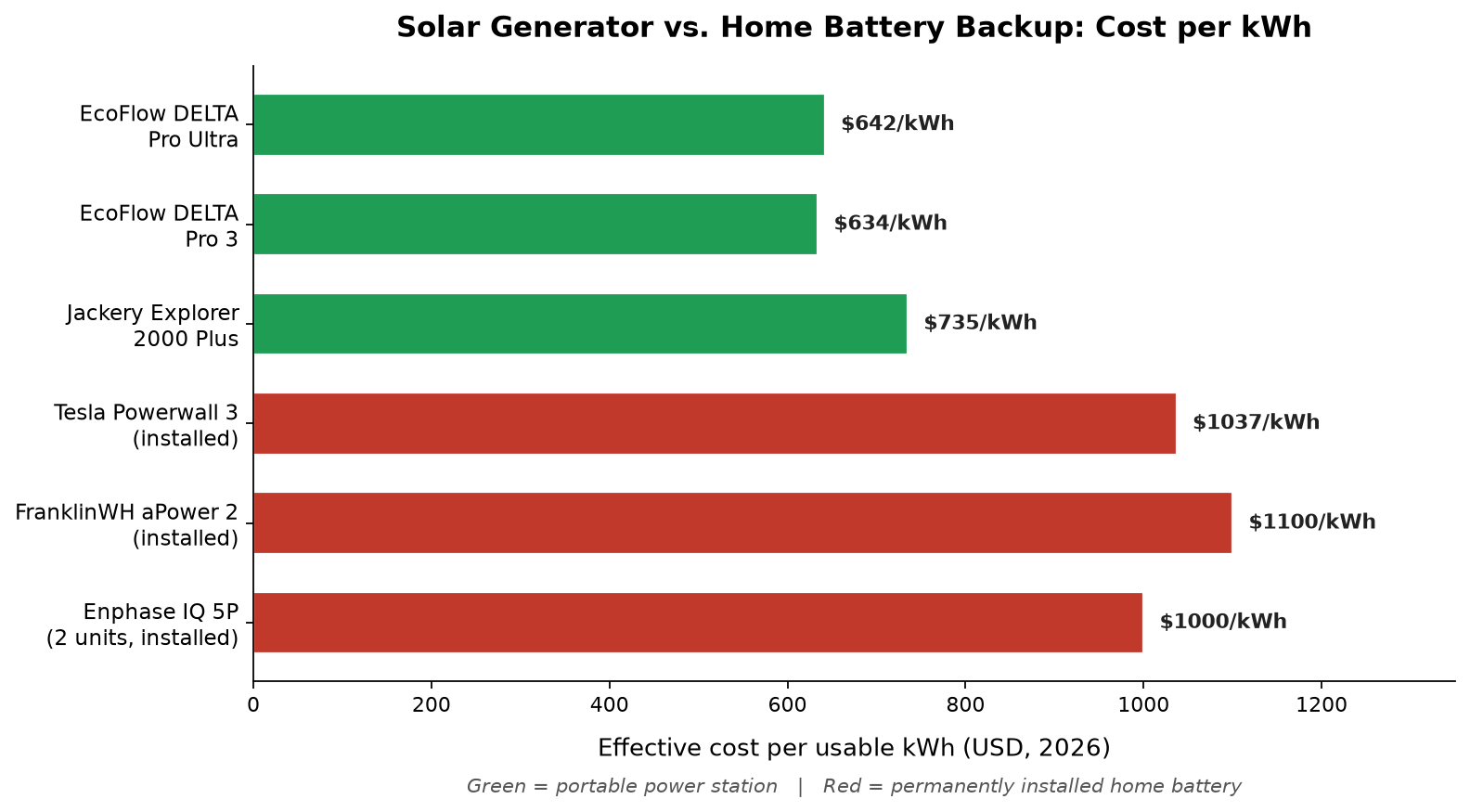
| Cost per kWh | ~$630–$735 | ~$1,000–$1,100 |
| Installation | None — plug and play | Electrician + permits (weeks) |
| Switchover | Manual (or ~20ms EPS) | Automatic, milliseconds |
| Typical capacity | 1–6 kWh | 13.5–45+ kWh |
| Solar recharge | Yes, portable panels | Yes, rooftop solar |
| Federal tax credit | Usually no | Yes |
| Portability | Excellent | None |
Which Keeps You Online Longer? The Runtime Math
Here’s where capacity actually matters. Using our ~110W “stay online” load (Starlink + router + 2 cameras + radio), here’s roughly how long each option runs before it’s dead.
| System | Usable Capacity | Runtime @ ~110W |
|---|---|---|
| EcoFlow DELTA 2 Max (2 kWh) | ~1,740 Wh | ~16 hours |
| EcoFlow DELTA Pro 3 (4 kWh) | ~3,690 Wh | ~33 hours |
| Tesla Powerwall 3 (single) | ~13,500 Wh | ~5+ days |
With a single 200W solar panel adding roughly 1–1.4 kWh per sunny day, a 4 kWh solar generator can keep you online indefinitely through daytime outages — as long as the sun cooperates. A home battery paired with a 6–8 kW rooftop array does the same for your whole house, day and night.
For context, even a small portable unit beats a basic surge protector or UPS, which typically holds only a few minutes of runtime — enough to ride out a blip, not a real outage. And if you’re already running Starlink for rural internet, a power station sized to its ~60W draw is surprisingly affordable.
The Verdict: Which Should You Buy?
There’s no universal winner — only the right tool for your outage profile. Here’s how I’d decide.
Buy a solar generator if: your outages are measured in hours, not days; your priority is keeping internet, cameras, and radios online; you want something you can set up yourself today; or you also want portable power for camping and travel. A 2–4 kWh unit like the EcoFlow DELTA Pro 3 or Jackery Explorer 2000 Plus covers the “stay connected” use case for under $3,000, with no installer required. It pairs naturally with a solid home WiFi setup and a few reliable security cameras.
Buy a home battery backup if: you own your home and plan to stay; you want seamless, automatic switchover (no running to plug things in); you need to run heavy loads like a fridge, furnace, or well pump; or you already have rooftop solar and want to maximize self-consumption. The federal tax credit makes a single Powerwall 3 net around $8,000–$11,000 — steep, but it’s a permanent home improvement that adds resale value.
The hybrid play: if you’re not ready to commit to a $15,000 install, the EcoFlow DELTA Pro Ultra is an interesting middle ground — it’s a 6.1 kWh unit that expands up to 90 kWh and can be wired to a Smart Home Panel for partial automatic backup, starting around $4,000–$7,700. It straddles both worlds without a full electrician install.
My honest take for rural and off-grid-curious readers: start with a 2–4 kWh solar generator. It’s ready the day it arrives, and it’ll keep your MURS emergency radio and Baofeng charged too. Move up to a permanent home battery only when you’re ready to protect the whole house, not just your connection.
In the solar generator vs home battery backup decision, the portable unit wins for most short outages, while the installed battery wins for whole-home, hands-off protection.
Frequently Asked Questions
Can a solar generator power a whole house?
Not realistically. A 2–4 kWh solar generator can run your essentials (router, Starlink, cameras, lights, a fridge for a few hours) but not a furnace, central AC, or well pump simultaneously. Whole-home backup requires a permanently installed battery system sized to your total load — typically 13.5 kWh or more per unit.
Does a solar generator qualify for the federal tax credit?
Installed home battery storage may qualify for the Residential Clean Energy Credit if it meets IRS requirements — including being permanently installed at a qualifying U.S. residence and having a capacity of at least 3 kWh (IRS). Portable plug-in power stations usually do not qualify because they aren’t permanently installed property. Verify current IRS guidance or consult a tax professional before buying, since credit rules and expiration dates can change.
How long will a solar generator keep my Starlink online?
A 2 kWh unit like the EcoFlow DELTA 2 Max will run a standard Starlink dish (~60W) plus a router for roughly 16–20 hours. A 4 kWh unit like the DELTA Pro 3 extends that to about 30–35 hours. Add a 200W solar panel and you can stretch it indefinitely on sunny days.
Is a home battery better than a gas generator?
For short outages and indoor safety, yes — batteries are silent, emit no fumes, and need no fuel or maintenance. For multi-day outages in winter with no sun, a dual-fuel gas generator still wins on runtime per dollar. Many homeowners keep a small battery for instant switchover and a gas generator for extended backup.
I have a propane-fuel Generac standby generator. It is connected to a 250 gallon propane tank. It can keep my whole house going for weeks. To-date the longest electric company power outage I have experienced is 60 hours. I installed the Generac at my home 16 years ago when we first moved into this rural area home…long before power stations and solar were practical for home owners. SO glad we did.
What size solar generator do I need to stay online?
For a typical “stay connected” load of about 100–110W (Starlink + router + 2 cameras + radio), a 2 kWh solar generator gives you roughly 16 hours of runtime — enough for most outages. Step up to 4 kWh if you want to add a fridge or ride out longer failures.
For cost effective protection of single devices see my comparison post for surge protector vs. UPS.