
Surprise! Roku cameras are Wyze cameras
My Quest for Reliable Security Cameras Without Breaking the Bank
I’ve spent the last year trying to find a reliable home security camera system that doesn’t force me into a $10-a-month subscription just to view my own footage. My goal was simple: affordable cameras, decent app, and the ability to see them on something bigger than my phone. After trying a few budget brands, I finally settled on Roku cameras.
Why Roku? That’s where it gets interesting, and it’s the reason I’m writing this. If you’re looking at Roku cameras, you need to know that Roku cameras are Wyze cameras with a different logo.
Roku = Wyze: The Truth About Who Makes Them
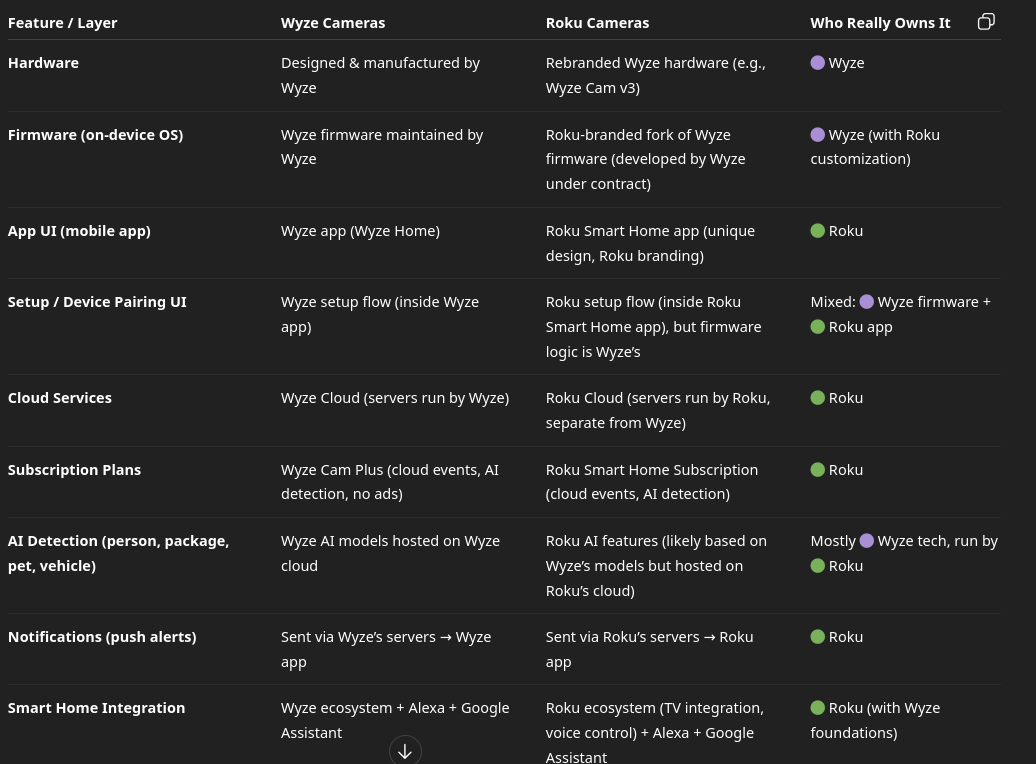
Let’s be clear: neither Roku nor Wyze actually manufactures cameras in-house. Both brands use an OEM manufacturer in China (and increasingly Vietnam to avoid U.S. tariffs) to build the hardware. Wyze designed the software ecosystem, and Roku licenses it and re-brands the hardware for the Roku Smart Home system.
That means when you buy a Roku camera, you are literally buying Wyze hardware. The firmware looks almost identical, the specs are identical, and even the mounting accessories are interchangeable. Here’s a quick breakdown of what you’re really getting:
| Roku Model You Buy | Real Wyze Equivalent | Key Specs |
|---|---|---|
| Roku Indoor Camera SE | Wyze Cam v3 | 1080p, Color Night Vision, IP65 |
| Roku Indoor Camera 360 | Wyze Cam Pan v3 | 1080p, 360° Pan/Tilt, Motion Tracking |
| Roku Outdoor Camera SE | Wyze Cam Outdoor v2 | Wireless, Battery Powered, IP65 |
| Roku Floodlight Camera | Wyze Cam Floodlight | 2600 Lumens, 1080p, Siren |
Why I Chose Roku Cameras Over Wyze Cameras
If Roku cameras are Wyze cameras, why didn’t I just buy Wyze? It came down to two deal-breakers for me: big-screen viewing and subscriptions.
When I started this project, I wanted to monitor my cameras on a large monitor in my office, not just squint at my phone. Wyze makes you pay for their Cam Plus subscription if you want reliable web viewing, and their TV integration is clunky. I didn’t want to dedicate a whole PC just to keep a browser tab open to view my cams, and I definitely didn’t want another monthly bill for basic features like person detection and longer clip history.
This is where Roku completely wins for someone like me who already lives in the Roku ecosystem.
I ended up dusting off an old 24-inch HDMI monitor I had in my storage closet. I plugged in the cheapest Roku streaming stick I could find on Amazon, connected it to Wi-Fi, and added the Roku Smart Home channel. That was it. Done. I can now monitor all my cameras on that monitor for free. No PC required, no monthly fee. Since we have Roku TVs in the house, I can also pull up any camera on our big-screen living room TV with my voice remote.
There is another free option: you can monitor your cams on a PC by logging into your Roku account’s cloud website. I tried this initially, but I have to be honest, Roku’s cloud web viewer is not robust enough yet. My cameras repeatedly dropped offline and showed “offline” even when they were recording fine in the app. I do NOT have this problem at all when streaming from the Roku stick. The stick method is rock solid and reliable.
The Cons: Where Roku Still Needs Work
I’m not going to sugarcoat it. Roku’s camera UI is VERY simplistic compared to Wyze.
If you use the website interface, you can view multiple cameras in a grid at the same time, which is great in theory, but again, I found it unreliable with constant disconnects. When you stream from the Roku stick, you can only see one camera at a time in full-screen. Unless you enable Carousel Mode, which will automatically flip through all available cameras one at a time at an interval you set, like 20 seconds. It works, but it’s not a true multi-cam dashboard.
Also, good luck finding a live human at Roku for support. I wanted to give them product feedback about adding a true 4-camera split-screen to the streaming stick app, and there is no easy way to do it. They are clearly relying on Wyze for firmware updates and UI improvements.
The Pros Outweigh The Cons — For Me
Despite the cons, I can live with what Roku gives me for free. That is the bottom line for my budget setup.