
Amazon Fire TV Stick HD vs Roku Streaming Stick HD — Which Wins The Battle?
Last week I scored a pristine 20-inch Vizio HD TV at Goodwill for $6.00. I powered it up in the store — even with no antenna it looked great. My wife has been asking for a TV in the kitchen, so this was about to finally check that box.
Streaming-wise, we are a Roku household. But when I went to buy another Roku Streaming Stick HD on Amazon, I was shocked — the price had more than doubled since the last time I checked.
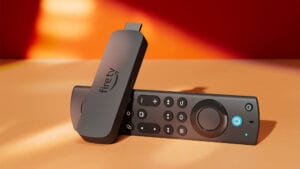
So I decided to tip-toe into Amazon’s ecosystem and grabbed the Amazon Fire TV Stick HD for $17.99. Note: It’s no longer available at that price. This week it has more than doubled too. If you’re shopping for budget sticks, this Fire TV Stick HD vs Roku Streaming Stick HD comparison is more relevant than ever.
Why Compare Fire TV Stick HD vs Roku Streaming Stick HD?
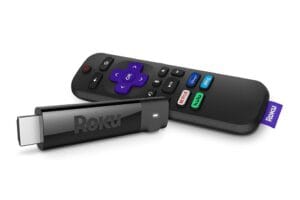
Both of these are 1080p HD-only sticks aimed at older TVs, second TVs, and kitchen or garage setups. They are cheap, hide behind the TV, and run on TV USB power. For a $6 thrifted Vizio, spending $50+ on a 4K stick made no sense. This battle is about simplicity, remote control, and UI clutter — not 4K HDR specs.
Head-to-Head Spec Comparison
| Feature | Amazon Fire TV Stick HD | Roku Streaming Stick HD |
|---|---|---|
| Resolution | 1080p Full HD, HDR, HDR10, HLG | 1080p Full HD, HDR |
| Remote | Alexa Voice Remote with TV power/volume | Roku Voice Remote with TV power/volume |
| Setup Experience | Excellent – auto-detects TV brand | Good – sometimes requires manual TV code steps |
| Home Screen | Very busy, heavy Amazon content push | Clean, grid of apps, minimal ads |
| Best For | Amazon Prime users, Alexa homes | Minimalists, YouTube TV users |
Installing And Setting Up The Amazon Fire TV Stick HD
Installation was very easy. I skipped the ridiculously short power cable in the box and used a longer micro-USB cable I had on hand with a standard 5W USB adapter. The stick hides perfectly behind my 20-inch Vizio.
Setup surprised me — in a good way. The Fire TV Stick HD immediately recognized its included remote and asked to pair with my Vizio TV. I allowed it and within 60 seconds the remote was controlling power and volume. This is FAR superior to the hoops I had to jump through when I set up a Roku stick on another TV, where I had to manually hunt for the TV code.
Once online, it prompted me with a lot of gibberish about adding channels. The ONLY one I wanted was YouTube TV. I got it added quickly and figured out how to move it to the first position in what is a VERY busy home screen.
Home Screen: The Biggest Difference in This Battle
This is where the Fire TV Stick HD vs Roku Streaming Stick HD debate is decided for me.
Amazon Fire TV Stick HD: Busy and Salesy
Amazon’s intent with its overly busy home screen is clear: get you to buy additional streaming subscriptions. Auto-playing trailers, giant rows for Prime Video, Freevee, sponsored apps — it’s cluttered. Even after pinning YouTube TV to the front, you have to scroll past a lot of noise to get to your stuff. Nice try, Amazon. No thank you.
Roku Streaming Stick HD: Clean and Simple
Roku, on the other hand, is far less gimmicky. You can quickly choose the channel or channels you want prominently displayed. It’s a simple grid. No massive clutter, no hard sell. For a kitchen TV where my wife just wants to hit YouTube TV and go, Roku wins on usability.
Performance on an Older HD TV
On my Goodwill Vizio, both sticks performed identically for 1080p YouTube TV. No buffering, quick app launches. The Fire TV Stick HD feels slightly snappier when navigating menus thanks to its newer processor, but Roku boots directly to your last input faster.
If you have a slow Wi-Fi spot like a kitchen, both support dual-band Wi-Fi and worked fine on my 2.4GHz network.
Price and Value in 2026
When I bought the Fire TV Stick HD for $17.99, it was a no-brainer. As of this week, both sticks have doubled to the $34.99 – $39.99 range. At equal pricing, choose based on ecosystem:
- Buy the Amazon Fire TV Stick HD if: You use Prime Video, have Alexa devices, and want the easiest TV remote pairing.
- Buy the Roku Streaming Stick HD if: You want the cleanest home screen, hate upsells, and live in YouTube TV, Netflix, or Hulu.
Final Verdict: Which Wins For a $6 Kitchen TV?
For my use case — a cheap kitchen TV that just needs YouTube TV — the Roku Streaming Stick HD still wins for daily ease of use. The Fire TV Stick HD wins for initial setup and remote pairing.
If Amazon would give us an option for a minimal, Roku-like launcher, the Fire Stick would win outright. Until then, I’m keeping the Fire Stick in the kitchen because I already own it, but my next thrift-store TV will get a Roku.
Which one are you using on your older HD TV? Let me know in the comments.
FAQ: Fire TV Stick HD vs Roku Streaming Stick HD
Does the Fire TV Stick HD work on old Vizio TVs?
Yes. It worked perfectly on my 20-inch Vizio HD TV from Goodwill. You just need an open HDMI port and a USB port for power, or a wall adapter. Wall adapter is best. Some TVs don’t have enough power emitting from USB ports.
Which is better for YouTube TV?
Both run YouTube TV in 1080p. Roku has a cleaner path to the app. Fire TV buries it under Amazon content unless you pin it to the front of your recent row.
Can you use a Roku remote with a Fire Stick?
No. Each stick only works with its own remote system, though both can control your TV’s power and volume after pairing.